Vercel agent-desktop: Computer Use Without Screenshots

Vercel Labs released agent-desktop, an open-source command-line tool that lets AI coding agents read and operate native desktop apps on macOS, Windows and Linux. It works through the operating system's accessibility tree instead of screenshots. The agent gets a JSON list of buttons, fields and menus, each with a ref ID, and acts on those refs, so no vision model has to guess pixel coordinates. If you already run Claude Code, Codex or Cursor in a terminal, agent-desktop lets that agent use the rest of your computer too.
Key takeaways
- agent-desktop is a Rust CLI and C library under the Apache-2.0 license, published by Vercel Labs. Chris Tate announced it on October 31, 2026 as "agent-browser, for your whole computer" (X post).
snapshotreturns an app's accessibility tree as JSON with a ref for each actionable element. The agent clicks, types or toggles by ref, then takes a new snapshot to check the result.- The tool embeds no LLM and has no GUI or interactive prompt. Your existing coding agent runs the observe-act loop.
- It runs on macOS 13+, Windows 10 1809+ and Ubuntu 24.04+. Version 1.0.0 added Linux on October 27, 2026; the current release is 1.0.2 from October 30.
- It can't see UI that exposes no accessibility tree, it leaves web pages to agent-browser, and its docs describe no sandbox. Run it in a VM with test data.
What is agent-desktop?
agent-desktop is a desktop automation tool that AI agents call from the shell. The GitHub README describes it as "computer use for AI agents: read and operate desktop apps through the OS accessibility tree." Each command prints one JSON envelope and exits, so any agent that can run a shell command can use it.
The accessibility tree is the structured description of a user interface that operating systems already expose for screen readers. Every button, text field, checkbox and menu item has a role, a name and often a value. agent-desktop reads that tree through each platform's native API: AX on macOS, UI Automation on Windows and AT-SPI on Linux, according to the official docs.
Its AGENTS.md says it is "a tool, not an agent": the observe-act loop lives in the calling agent, and the tool never embeds a model. The repository had about 7,100 GitHub stars and 519 forks on November 2, 2026, two days after the announcement.
How agent-desktop works: snapshot, act, verify
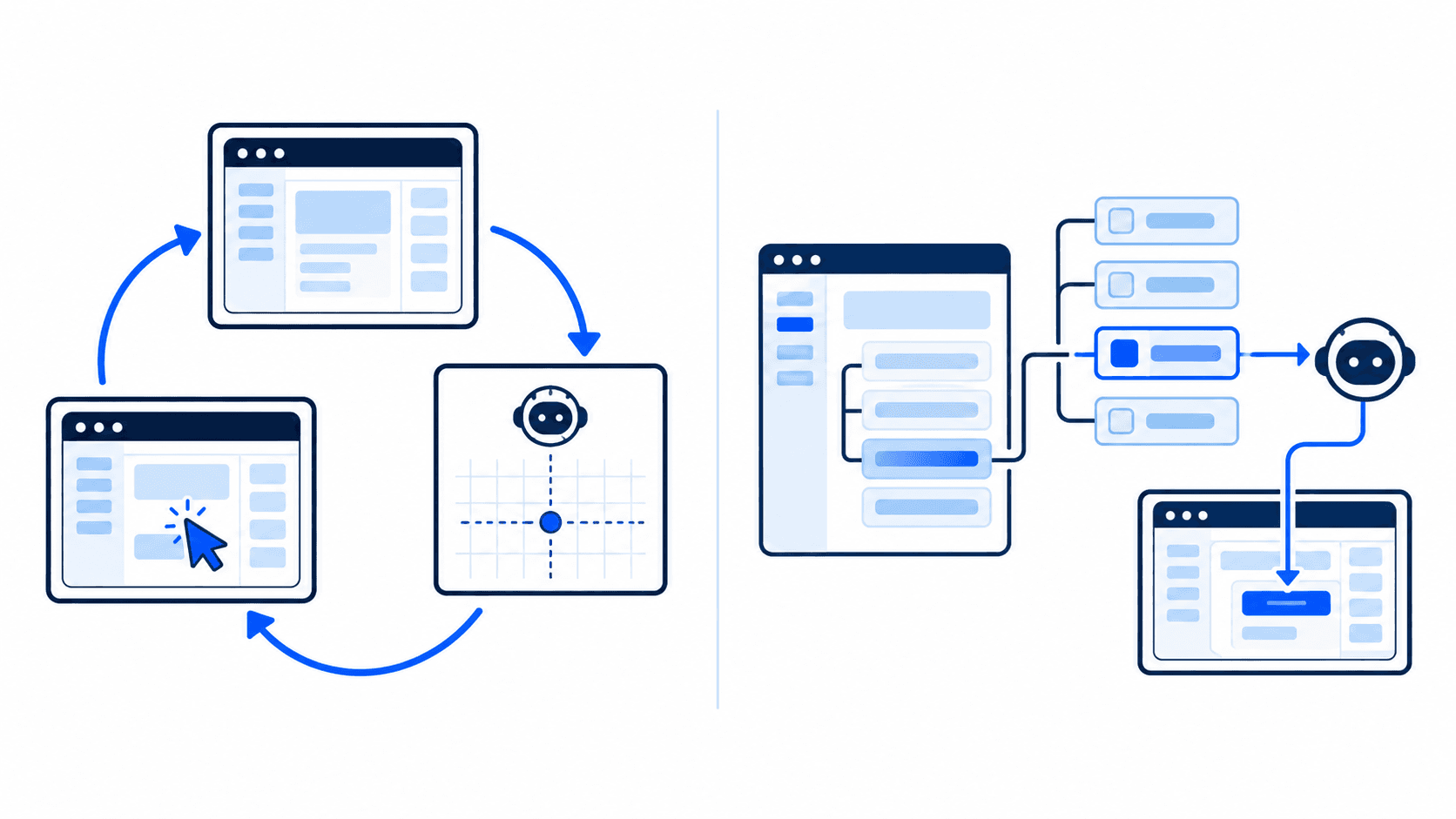
The official quick start shows the whole loop in four steps: map the app, drill into a region, act on a ref, and verify.
- Map.
agent-desktop snapshot --app gnome-calculator --skeleton -i --compactreturns a compact outline of a dense app. - Drill.
snapshot --rootwith a ref from the skeleton expands one region. - Act.
agent-desktop click @s2txcl95uvubmn:e11presses the element with that ref. - Verify.
agent-desktop wait --element @s2txcl95uvubmn:e6 --predicate value --value 7waits until the display reads 7.
The verify step is deliberate. The docs say a successful action alone does not prove the UI changed. Its design notes separate "verified delivery," "unverified delivery" and "not delivered," and the core never adds a blanket success flag.
Refs belong to a snapshot
Every ref carries the ID of the snapshot it came from, as in @s2txcl95uvubmn:e11. A bare @e8 is rejected with INVALID_ARGS. Before an action, the tool re-locates the element using stored evidence such as process ID, role, path, text and bounds. If nothing matches, it returns STALE_REF. If several elements match, it returns AMBIGUOUS_TARGET and the agent has to snapshot again. On a desktop, a click on the wrong button can send or delete something, so refusing is the safer failure.
Headless by default
Ref actions go through the accessibility API "without moving the pointer or taking focus," per the README. You can keep working while an agent fills in a form in another window. A global --headed flag switches to physical mouse and keyboard input for apps where the accessibility actions are not enough.
60 commands, same names on every OS
The CLI ships 60 command names, 56 of them working. They fall into a few groups:
- Observe:
snapshot,find,get,is,screenshot,list-surfaces - Act on a ref:
click,type,set-value,select,toggle,check,expand,scroll-toand more - Keyboard and mouse:
press,hover,drag,mouse-click,mouse-wheel - Apps and windows:
launch,close-app,list-windows,focus-window,resize-window,minimize - System: notifications, clipboard,
wait,batch,permissions,skills
The four commands that would hold a key or mouse button down (key-down, key-up, mouse-down, mouse-up) refuse to run for now. They stay disabled until a daemon exists that can release a held input if the agent crashes.
agent-desktop vs screenshot-based computer use
Computer use means letting an AI model operate a computer's graphical interface the way a person does: look at the screen, then click and type. Screenshot-based computer use, the approach behind Anthropic's computer use tool and similar features, sends the model an image of the screen and gets back pixel coordinates to click. agent-desktop sends structured text instead.
| Screenshot-based computer use | agent-desktop (accessibility tree) | |
|---|---|---|
| What the model sees | Full-screen images | JSON tree of roles, names and values |
| How it targets a control | Pixel coordinates | Snapshot-scoped ref IDs |
| Input cost per look | About 1,000 to 1,800 tokens per screenshot (Anthropic docs) | Text only; size depends on the app's tree |
| Moves your pointer | Yes | No, by default |
| Wrong-target behavior | Clicks wherever the coordinates point | Fails with STALE_REF or AMBIGUOUS_TARGET |
| Works on apps with no accessibility data | Yes, anything visible | No |
| Needs a vision model | Yes | No |
Anthropic's computer use documentation puts each screenshot at roughly 1,000 to 1,800 input tokens. It also warns that "Claude sometimes acts as if its actions succeeded without explicitly checking their results." agent-desktop addresses both problems with text snapshots and an explicit verify step.
The trade-off is coverage. Screenshots work on anything that renders pixels: games, canvas-heavy apps, remote desktops. agent-desktop only sees what an app reports to the accessibility layer. Dense apps can also produce very large trees, which is why the README recommends mapping them with --skeleton first and drilling in with --root. For an earlier look at screenshot-driven agents, see our post on GPT-6.1 Terra's computer use.
agent-desktop and agent-browser
agent-desktop is a sibling of agent-browser, Vercel Labs' browser automation CLI for agents. That project had about 45,200 GitHub stars on November 2, 2026, is also Apache-2.0, and can run as an MCP server. It uses the same idea: snapshot the page's accessibility tree, get short refs like @e2, act on them.
The two split the work by surface. agent-desktop's docs say it does not automate web pages and point to agent-browser for that. For Chromium and Electron desktop apps, agent-desktop can open a DevTools port that agent-browser then connects to. One agent can drive native windows with one tool and web content with the other, using the same snapshot-and-ref habits.
How to install and set up agent-desktop
Installation goes through npm, which also works with Bun, Yarn and pnpm:
- Run
npm install -g agent-desktop. The package bundles native binaries for x64 and ARM64. Developer Flavio Copes notes that it needs Node 18 or newer. - Run
agent-desktop statusto check the install. - Grant permissions. On macOS, the terminal or agent host needs Accessibility permission;
agent-desktop permissions --guidewalks through it. On Windows, apps at the terminal's integrity level need no grant. On Linux you need a graphical session withat-spi2-core. - Run
agent-desktop skills get desktop. This prints the usage guide an agent should read first, compiled into the binary.
Platform requirements from the docs:
| OS | Minimum | Architectures | Accessibility API |
|---|---|---|---|
| macOS | 13 or later | Intel, Apple Silicon | AX |
| Windows | 10 1809+, Server 2019+ | x64, ARM64 | UI Automation |
| Linux | Ubuntu 24.04+ (glibc 2.35 floor) | x86_64, aarch64 | AT-SPI |
Support is not identical everywhere. The README's capability table marks macOS shell surfaces as planned. Linux mouse input needs X11 and --headed, and Wayland clipboard access needs wl-clipboard.
There is no official plugin or MCP server for Claude Code, Codex or Cursor yet. Copes, who tested version 1.0.2 on Ubuntu, connected it through a skill file or an AGENTS.md entry. He also measured about 146 ms per call when npm install scripts are blocked, against about 21 ms with the native binary linked.
Release timeline
The changelog shows that the public announcement came after several weeks of releases:
- 0.10.0, October 18, 2026: Windows support (x64 and ARM64). Bare
@eNrefs were removed in favor of snapshot-qualified refs. - 1.0.0, October 27, 2026: Linux support through AT-SPI. The macOS, Windows and Linux CLI and C library shipped together as 1.0.
- 1.0.2, October 30, 2026: clearer permission guidance on macOS and a notice when blocked install scripts slow the launcher.
- October 31, 2026: public announcement by Chris Tate.
Risks and limits to know before you use it
An agent that can click anything on your desktop can also click the wrong thing, including "send," "delete" or "approve payment."
- The README warns that snapshots and screenshots may contain private data and should stay out of public logs and uploads. A snapshot of your mail client includes your mail.
- The project's security policy covers vulnerability reporting only. It says nothing about sandboxing or prompt injection.
- Text inside an app (an email, a document, a chat message) reaches the model as data, which opens the door to prompt injection. Anthropic's computer use docs warn that models sometimes follow instructions found in content and recommend a dedicated VM or container, no access to logins, and human confirmation for consequential actions. The same advice applies here.
- An optional helper called JEV sends screen descriptions to a model provider you configure. It is separate from the native CLI, so check whether it is on before you use it with sensitive apps.
Agent tooling has become a target on its own, as the recent trojanized Claude Code extension on Cursor showed. Install agent-desktop only from the official npm package or GitHub releases, which the changelog says carry checksums and build provenance.
Who should try agent-desktop?
It fits developers who already run a terminal coding agent and keep hitting the edge of the browser: testing a native app's UI, filling forms in a desktop tool with no API, or checking that a build actually launches. QA teams will find the structured refs and the explicit verify step easier to trust than coordinate clicks. If your target is a game, a remote desktop session or a custom-drawn canvas, screenshot-based computer use is still the only option.
FAQ
Is agent-desktop free?
Yes. The CLI and C library are open source under the Apache-2.0 license, and installation is a single npm install -g agent-desktop. The tool itself makes no model calls, so the only cost is whatever your coding agent already uses.
Does agent-desktop use screenshots?
Not by default. agent-desktop reads the operating system's accessibility tree and returns it as JSON with ref IDs, so the agent acts on structured data instead of pixel coordinates. A screenshot command exists for cases where the agent needs to look.
Which AI agents work with agent-desktop?
Any agent that can run shell commands, including Claude Code, Codex and Cursor's agent. There is no dedicated plugin or MCP server yet; you point the agent at the tool with a skill file or an AGENTS.md entry, and agent-desktop skills get desktop prints the usage guide.
What is the difference between agent-desktop and agent-browser?
agent-browser automates web pages in a browser; agent-desktop automates native desktop apps on macOS, Windows and Linux. Both come from Vercel Labs and use the same snapshot-and-ref approach. For Chromium or Electron apps, agent-desktop can open a DevTools port for agent-browser to connect to.
Is it safe to let an AI agent control my desktop?
Only with precautions. agent-desktop documents no sandbox, and app content can carry prompt injection. Run it in a virtual machine or a test account, keep sensitive apps closed, and require human confirmation for actions that send, pay or delete.
Sources
- vercel-labs/agent-desktop on GitHub (README)
- agent-desktop documentation
- agent-desktop CHANGELOG
- agent-desktop AGENTS.md (architecture and design rules)
- agent-desktop SECURITY.md
- vercel-labs/agent-browser on GitHub
- Chris Tate's announcement on X, October 31, 2026
- Anthropic: Computer use tool documentation
- Flavio Copes: A deep dive into agent-desktop